

To support our research and detailed appliance reviews, we may earn a small commission from qualifying purchases made through our links, at no extra cost to you. As an Amazon Associate, I earn from qualifying purchases.
To support our research and detailed appliance reviews, we may earn a small commission from qualifying purchases made through our links, at no extra cost to you. As an Amazon Associate, I earn from qualifying purchases.
If you are looking for the best smart thermostat for heat pump with aux heat, the most important feature is not simply Wi-Fi control or a sleek display. Your thermostat needs to understand how a heat pump, auxiliary heat, compressor stages, and—where equipped—emergency heat work together.
For most homeowners with a heat pump and electric auxiliary heat, the ecobee Smart Thermostat Premium is the strongest overall choice because it combines broad heat-pump compatibility with detailed control over equipment operation. The Google Nest Learning Thermostat (4th gen) is an excellent alternative for Google Home users, particularly because its Heat Pump Balance feature can automatically manage AUX heat use. The Honeywell Home T9 is another worthwhile option when room-by-room comfort and remote sensors are priorities.
The right choice, however, depends on your exact HVAC configuration. Before buying, check the number of heating and cooling stages, AUX wiring, reversing-valve configuration, power requirements, and whether your system is dual-fuel.
Google Nest Learning Thermostat (4th gen) Check Price on Amazon
Quick comparison: 2026 smart thermostats for heat pumps with AUX heat
| Thermostat | Best for | Heat-pump / AUX Advantage | Main Consideration |
|---|---|---|---|
| ecobee Smart Thermostat Premium | Best overall | Detailed equipment and temperature-threshold control | Higher price |
| Google Nest Learning Thermostat (4th gen) | Best for Google Home | Heat Pump Balance automates AUX management | Less appealing if you want extensive manual control |
| Honeywell Home T9 | Best for room sensing | Smart Room Sensors and broad HVAC support | Verify the exact equipment configuration |
| ecobee Smart Thermostat Enhanced | Best mid-range ecobee | Multistage and dual-fuel heat-pump support | Fewer premium features |
| ecobee Smart Thermostat Essential | Best budget ecobee | Smart control at a lower price | More limited multistage support |
What makes a thermostat good for a heat pump with AUX heat?
A heat pump normally provides the primary heating. Instead of creating heat directly like a conventional electric resistance heater, it transfers heat from outside into the home. As outdoor conditions become colder, the heat pump may need assistance from auxiliary heat, often electric resistance heat.
That creates a balancing problem.
You want the heat pump to operate efficiently when it can meet the home’s heating demand, but you also want AUX heat available when the heat pump needs help. Electric resistance heat can consume substantially more electricity than operating the heat pump, so thermostat staging and temperature controls matter.
A good heat pump thermostat with auxiliary heat should therefore provide some combination of:
- Heat-pump compatibility
- AUX or second-stage heat support
- Emergency Heat support where the HVAC system provides it
- Multiple heating stages
- Compressor and AUX temperature controls
- Intelligent staging
- Remote temperature sensors
- Scheduling and app control
- Energy-use information
- Compatibility with the home’s wiring
- Support for the appropriate reversing-valve configuration
This is why a thermostat designed mainly for a conventional furnace should not automatically be considered the best thermostat for heat pump with electric aux heat.
A useful distinction: AUX heat vs. Emergency Heat
These terms are sometimes used interchangeably, but they describe different operating situations.
AUX heat is backup heat that can operate automatically while the heat pump is running. Emergency Heat is generally a manually selected mode that locks out the heat pump and operates the backup heat source instead.
Google explicitly distinguishes the two: its Nest thermostats can automatically use AUX heat as needed, while Emergency Heat is manually activated on compatible heat-pump systems.
That distinction matters when comparing thermostats.
1. ecobee Smart Thermostat Premium — Best Overall
For a homeowner who wants detailed control of a heat-pump system with electric backup heat, the ecobee Smart Thermostat Premium is the strongest overall pick.
The major advantage is configurability. Ecobee provides installation support specifically for heat pumps with auxiliary heat and offers a compatibility checker before installation.
Why ecobee Premium stands out
Detailed heat-pump control: Ecobee is designed to work with multistage and dual-fuel heat-pump configurations, although the exact capabilities depend on the model and HVAC setup.
AUX management: Ecobee’s installer settings allow homeowners and installers to configure how compressor and auxiliary heating should operate under particular conditions. That makes it particularly attractive when minimizing unnecessary electric AUX operation is a priority.
Smart sensors: The Premium includes a SmartSensor, which can help the thermostat account for temperatures in rooms beyond the wall where the thermostat is installed.
Smart-home integration: It also fits well into homes using major smart-home platforms.
Power flexibility: Ecobee says its thermostats use a dedicated 24VAC supply and offers a Power Extender Kit for many compatible installations without a conventional C-wire. However, the manufacturer recommends checking compatibility first.
The drawback
The Premium costs more than simpler smart thermostats. It can also be overkill if you only want basic scheduling and remote temperature control.
Best for: Homeowners who want detailed control of heat-pump and AUX operation rather than leaving every decision to automatic algorithms.
2. Google Nest Learning Thermostat (4th gen) — Best for Google Home
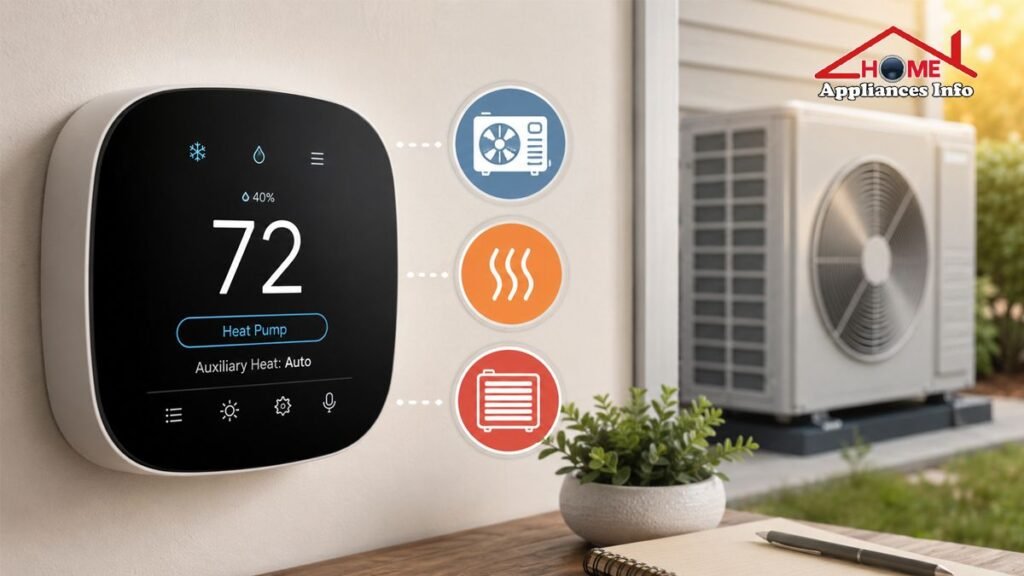
The Google Nest Learning Thermostat (4th gen) is the strongest alternative if your home already revolves around Google Home and you prefer automation.
Its most relevant feature for this use case is Heat Pump Balance.
Google says Heat Pump Balance is designed for heat-pump systems with AUX heat. When enabled, the thermostat can adjust the AUX lockout or breakpoint temperature based on the selected balance between comfort and savings.
That means you don’t necessarily have to determine one fixed AUX temperature yourself.
Nest provides choices such as:
- Max Comfort
- Balanced
- Max Savings
- Off, allowing manual lockout configuration
With Max Comfort, AUX may be used sooner to reach the desired temperature. Max Savings attempts to reduce AUX use by allowing the heat pump to operate longer. Balanced sits between those approaches.
For homeowners who do not want to constantly adjust HVAC thresholds, this is a compelling advantage.
What about Emergency Heat?
The 4th-generation Nest Learning Thermostat supports Emergency Heat on compatible heat-pump systems. Google states that Emergency Heat can be manually switched on when the primary heat pump is not working adequately.
The 4th-gen model also supports up to four heating stages on heat-pump systems—two heat-pump stages and two stages of alternate heating—and up to two cooling stages.
The trade-off
Nest is particularly attractive if you want the thermostat to automate decisions. Ecobee is generally more attractive to homeowners who want to inspect and fine-tune HVAC settings themselves.
Best for: Google Home households and homeowners who prefer automatic heat-pump/AUX balancing.
3. Honeywell Home T9 — Best for Room-by-Room Comfort
The Honeywell Home T9 remains a strong option for households where different rooms have noticeably different temperatures.
Its defining feature is the Smart Room Sensor system. Resideo says the T9 can use sensors placed in different rooms and work toward an average temperature or focus on selected rooms according to occupancy or scheduling.
That can be useful in a two-story house, a home with a particularly cold bedroom, or a property where the thermostat is installed in a room that is rarely occupied.
The T9 can also be configured for heat-pump systems with backup or auxiliary heat, and its documentation includes an Emergency Heat mode that locks out the heat pump while backup heat maintains the setpoint.
Best for: Homeowners who prioritize room sensing and balanced comfort across the house.
4. ecobee Smart Thermostat Enhanced — Best Mid-Range ecobee
The ecobee Smart Thermostat Enhanced is worth considering if you like ecobee’s approach but do not need every Premium feature.
Ecobee says the Enhanced supports two-stage heating and cooling and works with multistage and dual-fuel heat-pump systems.
It can therefore be a sensible middle ground for someone looking for a smart thermostat for heat pump applications without moving all the way to the flagship model.
The important caveat is that equipment compatibility should be checked for the exact installation rather than assumed from the product category.
5. ecobee Smart Thermostat Essential — Best Budget ecobee
The ecobee Smart Thermostat Essential is aimed at buyers who want smart scheduling, app control, energy information and HVAC automation without paying for the Premium model.
Ecobee states that Essential supports dual-fuel heat pumps and certain multistage configurations, but it has more limited staging support than its higher-end models. For systems requiring more complex multistage heating and cooling, ecobee directs buyers toward the compatibility checker and higher-capability models.
Best for: Buyers with a compatible, relatively straightforward system who want an affordable entry into the ecobee ecosystem.
Understanding the AUX heat lockout temperature
The AUX heat lockout temperature is one of the most misunderstood settings on a heat-pump thermostat.
Think of it as a temperature boundary that influences when the backup heat can operate.
For example, suppose a thermostat uses a particular outdoor temperature as an AUX breakpoint. Depending on the thermostat’s control strategy, AUX may be allowed or favored once outdoor conditions fall below that threshold.
But there is no universal “best” number.
A heat pump that performs well at low outdoor temperatures may have a very different economical operating point from an older or smaller system. Electricity prices, insulation, ductwork, equipment capacity and the manufacturer’s specifications also matter.
Google’s documentation illustrates the concept with a 40°F/4.4°C example, but that is an explanation of how a lockout works—not a recommendation that every homeowner should use 40°F.
What is the heat-pump balance point?
The heat pump balance point is the outdoor condition at which the heat pump’s capacity and efficiency no longer meet the home’s heating needs as effectively as the backup system.
It is useful to think of this as an equipment-specific operating point, not a universal thermostat setting.
If you set the AUX lockout too high, electric resistance heat may operate more frequently than necessary. If you set it too low, the heat pump may struggle to maintain comfort or run for long periods when backup heat would make more sense.
For that reason, follow the heat-pump manufacturer’s specifications and, when necessary, have an HVAC professional evaluate the system.
ecobee vs Nest for heat pump with emergency heat
For the specific question of ecobee vs Nest for heat pump with emergency heat, neither thermostat is automatically correct for every HVAC system.
The more useful comparison is how each approaches control.
| Feature | ecobee Premium | Nest Learning Thermostat 4th gen |
|---|---|---|
| Heat-pump compatibility | Strong | Strong |
| AUX heat | Yes, compatible configurations | Yes, compatible configurations |
| Emergency Heat | Depends on compatible system/configuration | Supported on compatible heat pumps |
| Manual threshold control | Strong | Available, with automation options |
| Automatic AUX balancing | More configuration-oriented | Heat Pump Balance |
| Room sensing | SmartSensor included | Supported sensing options |
| Best fit | Detailed control | Automation and Google Home |
Nest’s Heat Pump Balance can automatically determine a suitable AUX lockout strategy when enabled, while its advanced configuration also provides settings such as AUX upstage timer, droop and minimum delay on the 4th-generation model.
So the practical choice is simple:
Choose ecobee if you want more hands-on control over HVAC behavior.
Choose Nest if you prefer automatic management and already use Google Home.
How to set up AUX heat on a smart thermostat
The exact process depends on the thermostat and HVAC equipment, but the general workflow is straightforward.
1. Identify your equipment
Confirm:
- Heat pump or conventional system
- Number of compressor stages
- Number of heating stages
- Electric AUX or another backup heat source
- Emergency Heat availability
- Reversing-valve configuration
- C-wire/power requirements
- Whether the system is dual-fuel
2. Verify compatibility before touching the wiring
Use the manufacturer’s compatibility tool. Ecobee’s official checker is designed specifically to determine whether a thermostat is suitable for the home’s wiring and HVAC configuration.
3. Identify the AUX and reversing-valve terminals
Do not assume that every manufacturer labels terminals identically. Resideo’s documentation, for example, shows heat-pump configurations using O/B, AUX and E terminals, with variations depending on the equipment.
4. Select Heat Pump during setup
Do not configure a heat pump as a conventional furnace simply because the system provides heat through ductwork.
5. Configure AUX stages
Select the appropriate number and type of auxiliary heating stages supported by the equipment.
6. Configure the reversing valve correctly
The thermostat must know whether the reversing valve is energized for heating or cooling. An incorrect O/B setting can cause the system to operate improperly.
7. Configure temperature and staging controls
If your thermostat provides manual compressor or AUX thresholds, use the HVAC manufacturer’s recommendations as the starting point.
8. Test heating operation
Test normal heat first, then confirm that AUX heat operates when the system calls for it.
9. Test Emergency Heat separately
If the system has Emergency Heat, verify that the thermostat recognizes it and that selecting Emergency Heat produces the expected behavior.
Because incorrect wiring can damage equipment or create unsafe operation, professional installation is the better choice if you are unsure about the existing wiring.
What should you avoid when configuring AUX heat?
The biggest mistake is treating AUX heat as simply a faster version of normal heating.
Electric resistance backup heat can be useful, but unnecessarily frequent operation can increase electricity consumption. Google specifically notes that AUX heat can cost substantially more to operate than the heat pump, depending on the system.
At the same time, trying to eliminate AUX operation completely is not necessarily the right goal.
A properly configured system may need AUX heat during very cold weather, defrost cycles, recovery from a large temperature setback, or periods when the heat pump cannot meet demand quickly enough.
The objective is appropriate staging, not zero AUX use.
What to check before buying a heat-pump thermostat
Before ordering, look beyond the thermostat’s smart-home features.
Check heat-pump compatibility
This is the first requirement.
Check the number of stages
A thermostat that supports a single-stage system may not be suitable for a more complicated dual-stage heat pump.
Check AUX and Emergency Heat support
Confirm that the thermostat supports the exact backup configuration installed in your home.
Check the C-wire requirement
Some smart thermostats require a C-wire or an approved power solution. Ecobee provides a Power Extender Kit for many compatible installations without a C-wire, while specific models and systems have different requirements.
Check room-sensor support
Sensors are especially useful when the thermostat sits in a hallway or another location that does not represent the temperature where you spend most of your time.
Check the smart-home ecosystem
Consider whether you primarily use Google Home, Apple Home, Alexa, SmartThings or another supported platform.
Check utility incentives
If you are in the United States, also check your electricity provider for current smart-thermostat rebates. A rebate can change the value calculation considerably, particularly when comparing a premium thermostat with a less expensive model.
Final 2026 ranking
For a typical heat-pump system with electric auxiliary heat, these are the five models I would put on the shortlist:
1. ecobee Smart Thermostat Premium — Best overall
Best combination of heat-pump compatibility, configurable control, room sensing and smart-home functionality.
2. Google Nest Learning Thermostat (4th gen) — Best for automatic control
A strong choice for Google Home users who want Heat Pump Balance to manage AUX operation automatically.
3. Honeywell Home T9 — Best for room sensing
A good fit for homes where temperature varies significantly between rooms.
4. ecobee Smart Thermostat Enhanced — Best mid-range ecobee
A practical compromise for buyers who want ecobee’s platform without every premium feature.
5. ecobee Smart Thermostat Essential — Best budget ecobee
Best suited to compatible systems that do not require more advanced multistage capabilities.
FAQs
Is ecobee Premium good for a heat pump with electric AUX heat?
Yes. It is particularly attractive because ecobee supports heat-pump configurations and provides detailed installation and equipment configuration options. Compatibility should still be checked for the exact HVAC system before purchase.
What is the best AUX heat lockout temperature?
There is no universal temperature that is best for every heat pump. The appropriate setting depends on equipment capacity, outdoor performance, electricity cost, climate and the home’s heating demand. Use the manufacturer’s specifications rather than copying another home’s setting.
Is AUX heat the same as Emergency Heat?
No. AUX heat can operate automatically as part of the heat-pump heating strategy. Emergency Heat is generally a manually selected mode that uses the backup heat source while the heat pump is locked out.
Does Nest automatically control AUX heat?
When Heat Pump Balance is available and enabled, Nest can automatically adjust the AUX lockout/balance point based on the selected comfort-versus-savings setting.
Can I install a smart thermostat myself?
Sometimes, but compatibility and wiring are more complicated with heat pumps than with basic heating systems. If you are unsure about O/B, AUX, E, C-wire or multistage wiring, professional installation is safer.
Should I avoid AUX heat completely to save money?
No. AUX heat exists for a reason. The goal is to prevent unnecessary operation while allowing backup heat to assist when the heat pump genuinely needs it.
Conclusion
For homeowners comparing the best smart thermostat for heat pump with aux heat, the ecobee Smart Thermostat Premium is the strongest overall recommendation when detailed HVAC control is the priority.
The Google Nest Learning Thermostat (4th gen) is the better fit for people who prefer automation, Google Home integration and Heat Pump Balance. The Honeywell Home T9 deserves attention when room-by-room comfort and sensor-based temperature management matter most.
Most importantly, don’t choose a thermostat solely from a ranking list. A heat pump with auxiliary heat is a more specialized HVAC configuration than a conventional furnace-and-air-conditioner system. Verify the wiring, heating stages, backup heat type, reversing valve and power requirements before purchasing.
And when configuring the AUX heat lockout temperature, remember that the correct setting belongs to your particular heat pump—not to a generic chart found online. A properly matched thermostat should help the system use the heat pump efficiently while bringing in backup heat when it is actually needed.

🌐 FOUNDER & DIGITAL PUBLISHER
Muhammad Ali
Founder | SEO Strategist & E-E-A-T Digital Publishing Specialist

📈 SEO Strategy
🛠️ Appliance Optimization
🛡️ E-E-A-T Standards
Muhammad Ali is a digital publisher, SEO strategist, and founder of Home Appliances Info. He specializes in home appliance optimization, structured schema networks, and advanced E-E-A-T digital publishing standards to ensure accurate, trustworthy content across the platform.