

To support our research and detailed appliance reviews, we may earn a small commission from qualifying purchases made through our links, at no extra cost to you. As an Amazon Associate, I earn from qualifying purchases.
To support our research and detailed appliance reviews, we may earn a small commission from qualifying purchases made through our links, at no extra cost to you. As an Amazon Associate, I earn from qualifying purchases.
If you’re wondering how to reset the refrigerator water filter light after a filter change, the short answer is this: install the correct new cartridge, find the reset control on your model, and hold it until the light changes color or goes out. On many fridges that takes about three seconds. The exact button, and whether you need to press one at all, depends on the brand and model. Some newer GE refrigerators recognize a genuine replacement filter and clear the reminder on their own.
This guide covers how to reset the water filter light on a fridge from Samsung, Whirlpool, GE, LG and Frigidaire, which together cover many of the refrigerators in US kitchens. It also explains what the light measures, what to check when it stays lit, and why resetting the reminder is not the same as having a fresh filter.
What the Refrigerator Water Filter Light Actually Tells You
Most people assume the light is a sensor that checks the water. In most cases it is closer to a kitchen timer. GE explains that the replace-filter light is often a timed function rather than a sensor that measures the filter’s remaining capacity, and that some models use RFID instead. Frigidaire’s manuals for some PureSource models describe a version based on volume, prompting a change after a set number of gallons has passed through. Either way, the light only knows what the manufacturer programmed it to count, so it won’t notice if your water is unusually hard or the filter clogs early. Pitcher filters work on a similar reminder principle, which is why a Brita filter blinking red often just needs a reset too.
Colors vary by brand. Whirlpool describes a blue light as normal and orange as the cue to reset. GE uses red for “replace” and either green or no light after a reset. Samsung and Frigidaire both commonly move from red to green. Treat these as examples, because your owner’s manual defines what your own colors mean.
How to Reset Refrigerator Water Filter Light in 5 Easy Steps
Step 1: Confirm the filter is due
Check the indicator, think about when the cartridge was last changed, and look up the interval in your manual. Six months is the interval most manufacturers recommend, though filters differ in rated capacity. If the filter is overdue, change it first. Clearing the light on a worn-out cartridge hides the reminder without improving the water.
Step 2: Install the correct filter and flush it
Find your refrigerator’s model number and match it to the right cartridge. Filters that look alike often lock differently, and a wrong or loosely seated one can leak, slow the dispenser, or leave the indicator stuck. Whirlpool, for example, sells several numbered filters that are not interchangeable, a point covered in our Whirlpool refrigerator water filter guide on matching Filter 1 through 4 to a model.
Remove the old cartridge as your manual directs, take the protective cap off the new one, and turn or push it in until it locks fully into place.
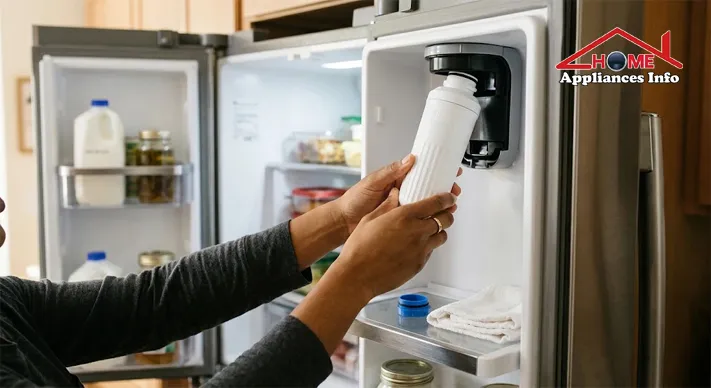
New filters need flushing before you drink from them, because they can release trapped air and fine carbon particles. Instructions differ by filter system, so follow yours rather than a universal number. LG’s support guidance calls for about 2.5 gallons of dispensed water after replacement. It also advises against dispensing that amount continuously, suggesting cycles of 30 seconds on and 60 seconds off. Whirlpool’s guidance for several of its filters calls for roughly four gallons. Frigidaire’s quick-start guides for some PureSource models describe running about 1.5 gallons, around three minutes, through the dispenser. While you flush, look around the housing for drips.
Step 3: Locate the refrigerator filter reset button
The reset control is not always a dedicated button, and it is not always in the same place. Look in these spots:
- On the dispenser control panel on the front of the door
- On a control panel mounted to the interior ceiling of the fresh food compartment
- Inside the fridge, near the filter housing
- On a touchscreen or digital display
- In a settings menu, on models with no physical filter button
On Whirlpool French door models, for instance, the control is typically on the interior ceiling panel. Some refrigerators have no physical refrigerator filter reset button at all and handle everything through a menu or automatically.
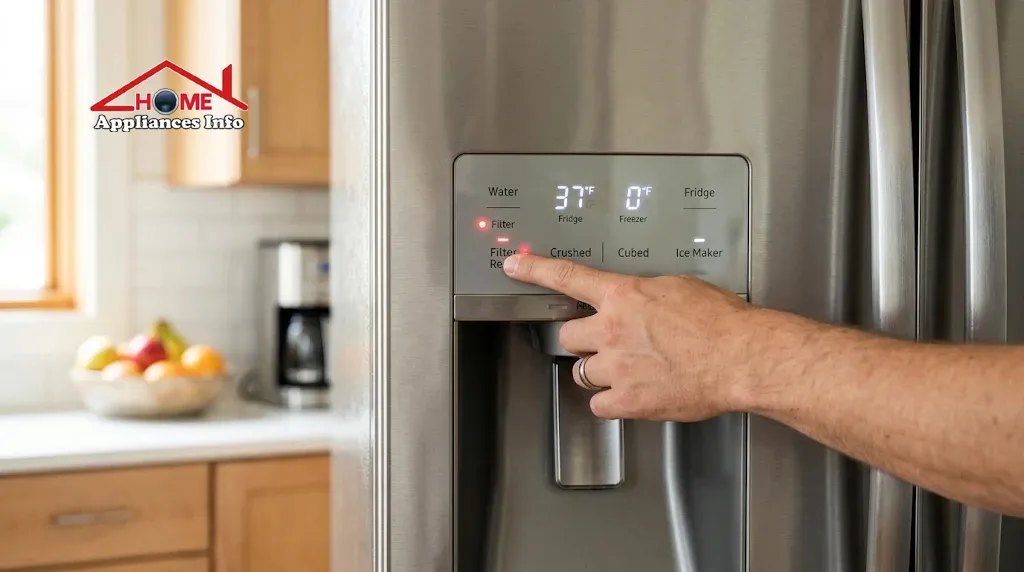
Step 4: Press and hold the right control
Many refrigerators use a hold of about three seconds, but the correct button and duration vary. These five examples show the range, and they are examples, not universal instructions.
| Brand | Common method | Worth knowing |
|---|---|---|
| Samsung | Hold Filter Reset, or use the app or menu | Family Hub and arrow-button models use menus |
| Whirlpool | Varies by model | Never resets by itself |
| GE / GE Profile | Hold the Reset Water Filter pad | RFID models reset automatically |
| LG | Hold Water Filter or Filter Reset | Panel must be unlocked |
| Frigidaire | Hold the Water Filter reset control | Display often goes red to green |
On Samsung, standard models use a Filter Reset button held for three seconds. Family Hub models go through Apps, Fridge Manager, Fridge Settings, then Water Filter and Reset, and arrow-button models use More Options followed by Filter Reset. Our Samsung refrigerator water filter maintenance tips cover filter models and upkeep in more detail.
Whirlpool is the least uniform. Its support documentation says the status light has to be reset every time the filter is replaced, that it does not reset automatically, and that the procedure depends on model and refrigerator type. Depending on the refrigerator, that can mean holding a Filter Reset button, touching Max Cool and Max Ice together for three seconds, or holding Light and Ice Type for three seconds. Water Filter Status Light Won’t Reset Side by Side Refrigerator +2
For GE and GE Profile, hold the Reset Water Filter pad for about three seconds. GE’s guidance says a long hold can make the light switch off and then come back on, so a short press of a few seconds is better. GE’s indicator light support page also explains that RFID filters reset the reminder without any button press, and that on those models the reminder cannot be reset manually.
On LG, press and hold the Water Filter or Filter Reset button for three seconds until a chime sounds or the indicator turns off. On some LG models you’ll hear one beep when you first press and a second after about three seconds. Frigidaire PureSource manuals describe a three-second hold of the water filter reset control, after which the display changes from red to green when the status has been reset.
Step 5: Confirm the indicator has reset
Don’t assume the press worked. Check that the red or orange light is gone or has changed color, that any beep or chime sounded, and that “Replace Filter” no longer appears on the display. Dispense a glass of water to confirm normal flow, and look at the filter housing for leaks. To reset the water filter light after changing the filter and have it stay cleared, make sure the filter is correctly locked in, since a poorly seated one can bring the warning back.
Refrigerator Water Filter Light Won’t Reset: What to Check
If the light stays on after you’ve followed the steps above, work through these in order before assuming something is broken.
Is the control panel locked? A locked dispenser or display can ignore button presses. LG’s guidance notes that a locked control panel prevents the indicator from resetting, and that holding the lock button for three seconds unlocks it. Frigidaire also points owners to the display lock when a dispenser seems unresponsive.
Did you press the right control for the right time? This is the most common slip. Compare what you did against your own manual, and remember GE’s advice that holding too long can undo the reset.
Does the fridge need to recognize the filter? On RFID models, a cartridge without the right chip, or one that isn’t fully seated, can leave the replace-filter message showing. GE says its RPWFE system uses RFID both to monitor filter status and to detect leaks, so a detected leak can also keep the warning on. If you see water near the unit, our guide to water leaking from a fridge helps you trace it.
Is the reset window closed? Some LG guidance says certain models can only be reset once the indicator has counted down fully. If you swapped the filter early, the manual may explain the rule for your model.
Is the filter correct and seated? An incompatible or loose cartridge can cause both a stuck light and slow water flow. Remove it, realign it, and reinstall.
Resist the temptation to unplug the fridge repeatedly. A power cycle is not a substitute for the correct reset procedure, and it can clear other settings you didn’t intend to change. If the light keeps returning with a correct filter and the right method, check the model-specific manual or contact the manufacturer’s support line.
When to Replace a Water Filter, and What a Reset Can’t Do
Resetting the indicator restarts a countdown. It does nothing for the cartridge itself. Replace the filter when any of these happen:
- The indicator comes on
- The dispenser pours noticeably slower
- The water or ice tastes or smells off
- The recommended interval has passed, usually about six months
- Your manufacturer calls for earlier replacement based on usage
Filters also differ in what they’re certified to do. The three standards you’ll see most often are NSF/ANSI 42 for aesthetic effects such as chlorine taste and odor, NSF/ANSI 53 for reduction of specific health-related contaminants, and NSF/ANSI 401 for certain emerging compounds. NSF describes these three as the leading industry standards for filtration products. Its overview of the three standards explains each one’s scope. Meeting a standard doesn’t mean a filter reduces every contaminant that standard covers, so check the claims listed for your specific cartridge.
Frequently Asked Questions
Can I reset the light without changing the filter?
Some models allow it, but it only silences the reminder. The cartridge stays as worn as before, so don’t use a reset to skip a needed replacement.
How long do I hold the reset button?
Three seconds is common, though some filter systems call for a different duration or a menu sequence. Your manual has the definitive answer, and on GE a very long hold can make the light return.
Does the light ever reset by itself?
On some models, yes. GE refrigerators with RFID-equipped filters clear the reminder automatically when a genuine replacement is installed. Many other brands, including Whirlpool, need a manual reset every time.
Can I keep using the fridge with the light on?
Usually, yes. A lit indicator typically means replacement is due and doesn’t mean the appliance has stopped working. The filter should still be changed according to the manufacturer’s instructions.
Where is the refrigerator filter reset button?
It may be on the dispenser panel, on the interior ceiling panel, near the filter housing, or inside a touchscreen menu. A few models have no dedicated button.
How often should the filter be changed?
Most manufacturers recommend about every six months, but the rated capacity of your specific filter and how much water your household uses can shift that. Change it sooner if the flow slows or the taste changes.
Conclusion
Knowing how to reset the refrigerator water filter light comes down to three things: using the right filter, finding the right control for your model, and confirming the light actually changed. If it still won’t clear, check the control lock, the filter’s seating and compatibility, and your manual before trying anything else. For more upkeep guides, browse our how-to and maintenance tips.
References
- GE Appliances Support. Refrigerator – Water Filter Indicator Light
- LG Electronics USA Support. How to replace the water filter in your LG refrigerator
- NSF. NSF/ANSI 42, 53 and 401: Filtration Systems Standards

🌐 FOUNDER & DIGITAL PUBLISHER
Muhammad Ali
Founder | SEO Strategist & E-E-A-T Digital Publishing Specialist

📈 SEO Strategy
🛠️ Appliance Optimization
🛡️ E-E-A-T Standards
Muhammad Ali is a digital publisher, SEO strategist, and founder of Home Appliances Info. He specializes in home appliance optimization, structured schema networks, and advanced E-E-A-T digital publishing standards to ensure accurate, trustworthy content across the platform.