

To support our research and detailed appliance reviews, we may earn a small commission from qualifying purchases made through our links, at no extra cost to you. As an Amazon Associate, I earn from qualifying purchases.
To support our research and detailed appliance reviews, we may earn a small commission from qualifying purchases made through our links, at no extra cost to you. As an Amazon Associate, I earn from qualifying purchases.
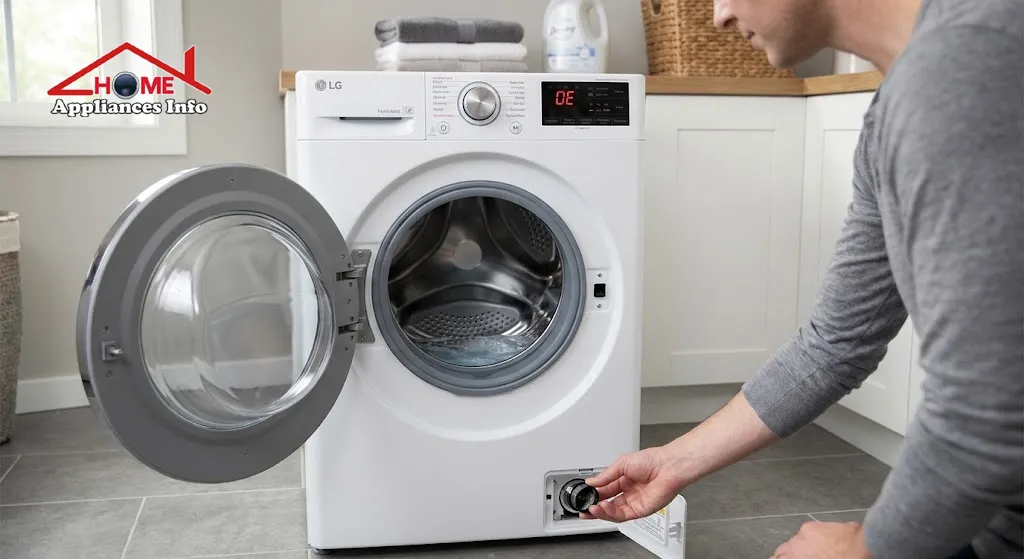
A washer that stops mid-cycle with water still sitting in the drum is frustrating before a cryptic code even appears. If your display is showing the LG washer OE error code, the message is simpler than it looks: the machine couldn’t empty the tub in the time it expected. In most homes the cause is something you can reach yourself, usually a clogged drain pump filter or a kinked drain hose. The five fixes below run from the quickest checks to the ones that point toward a repair.
What Does the LG Washer OE Error Code Mean?
LG describes OE as a water outlet error. The washer’s drain pump runs, but water doesn’t leave the tub fast enough, so the control board stops the cycle instead of carrying on with a full drum. You may see it during or after a wash or rinse, often with water still in the tub and clothes soaking wet.
The error is a symptom, not a diagnosis. It tells you that water isn’t leaving the machine, but not whether the problem is inside the washer, in the hose, or further down in your household plumbing. That distinction decides which fix works, and it’s why this guide follows an order of checks rather than a random list of tips.
The timing also varies by model. LG’s top-load guide says the code appears when the washer can’t drain for 13 minutes, but that figure comes from the top-load support page and shouldn’t be treated as a universal rule. Front-load machines, and different generations of the same line, can behave differently. If your manual gives other numbers, trust the manual.
If you’re still deciding between formats, our comparison of front load vs top load washers explains why the two designs handle water differently. The main practical difference here is that many front-loaders have a user-accessible drain pump filter, while top-load layouts vary more.
What Causes the LG Washer OE Error Code?
LG’s support pages point to the same short list of LG washer OE error causes. Some are mechanical, some are about your home’s plumbing, and one is a matter of too much soap.
| Likely cause | What it looks like | Where to start |
|---|---|---|
| Clogged drain pump filter | Slow draining, water left in the drum, sometimes odors | Filter cleaning (Fix 2) |
| Kinked or pinched drain hose | Error appears soon after the drain phase starts | Behind the washer (Fix 1) |
| Blocked household drain | Washer drains fine when the hose is moved elsewhere | Standpipe test (Fix 3) |
| Excess detergent suds | Filter and hose are clear, but the error returns | Reduce detergent, run Tub Clean (Fix 4) |
| Frozen hose or pump | Cold weather, laundry area near an exterior wall | Thaw safely (Fix 4) |
| Failing drain pump | No sound from the pump, or the code persists after everything else | Technician (Fix 5) |
Hair, lint, coins, hairpins and detergent residue are the usual culprits in the filter. LG notes that debris there can delay draining, cause odors, prevent proper spinning, and eventually damage the pump motor, which is a good reason not to ignore a partial clog.
How to Fix the LG Washer OE Error Code (Five Troubleshooting Methods)
Before you start, switch the washer off at the control panel and unplug it. Water left in the tub may be hot, so give it time to cool. If the drum is full, you’ll need to drain it before you can open anything, which Fix 2 explains.
Check the Drain Hose
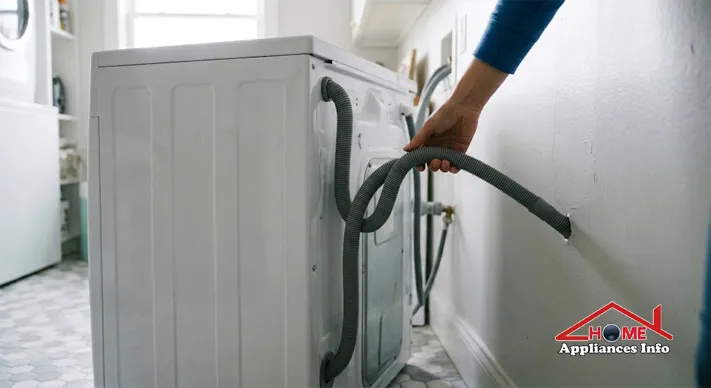
Start here because it costs nothing and takes two minutes. Pull the washer gently away from the wall and look at the hose where it leaves the cabinet and runs to the drain. You’re looking for sharp bends, a section pinched between the machine and the wall, or something pressed against it.
LG’s front-load guide asks you to check behind the washer for a kinked or clogged hose, straighten it, then run a spin cycle to see if the code clears. If you’ve recently moved the machine or installed a new one, a hose that was folded during the move is a common reason for this error. Hose routing and height also matter, but the correct positioning depends on your model, so follow the installation section of your manual rather than guessing at a height.
If the hose is straight and the error stays, don’t keep re-running cycles. Repeated failed drains just leave more dirty water in the machine.
Clean the Drain Pump Filter
If the hose looks fine, the drain pump filter is the next suspect. This is the core of LG washer drain pump filter cleaning, and it’s where most LG washing machine not draining problems end. The steps below follow LG’s current front-load instructions. Your model may differ, so check the manual if the layout doesn’t match.
- Turn the washer off and unplug it.
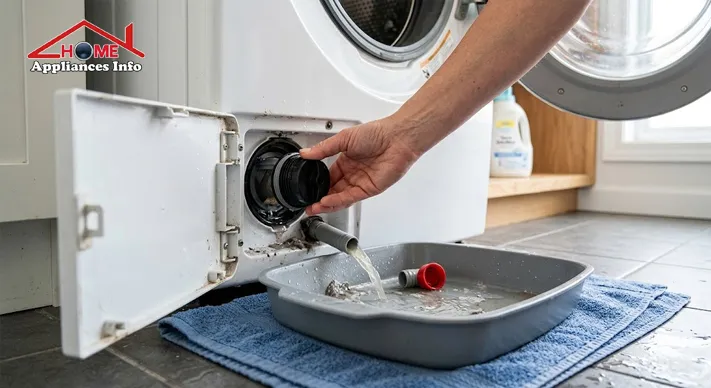
- Open the service panel at the bottom-left corner of the front. LG calls this the drain filter area.
- Place a shallow pan or towels under the opening. Water will come out.
- If the tub still holds water, unclip the small drain hose beside the filter, remove its cap, and let the water run into the pan. LG warns not to pull this hose out too far because that can kink it. If nothing comes out, push it back in about an inch.
- Once the water has stopped, place a hand towel under the filter and twist it counter-clockwise to remove it.
- Clean the filter with a soft-bristle brush and warm water. LG advises against washing it in a dishwasher. Clean the opening and base as well.
- Replace the cap on the small hose and reattach it, then screw the filter back in clockwise until it stops. A loose filter can leak, so make sure it’s seated firmly.
Don’t force a filter that won’t turn. If it’s stuck, stop and consult the manual or a technician rather than risking a crack.
LG recommends cleaning this filter at least once a month. Pockets are the main source of trouble, so checking them before each load prevents more clogs than any later cleaning will.
If the filter was packed with debris, LG suggests running a Tub Clean cycle afterward and then a normal cycle to check whether the code has cleared. For other ways people keep their machines fresh, our guide on cleaning a washing machine with vinegar and baking soda covers household-ingredient methods, though LG’s own Tub Clean cycle is the manufacturer-approved option, so check your manual before using anything else.
Check the Household Drainpipe
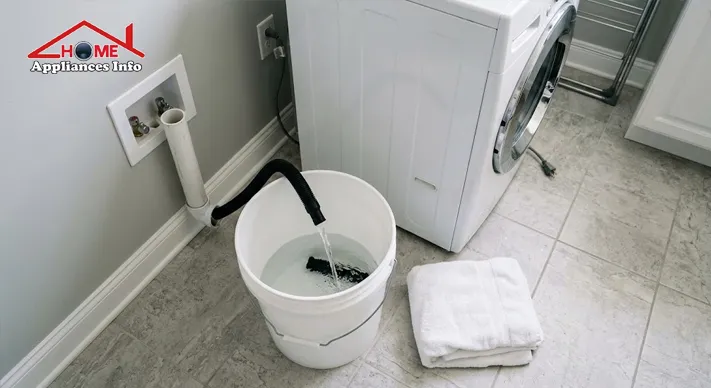
Sometimes the washer is fine and the plumbing isn’t. LG’s own guidance includes a clogged household drain as a possible cause, and the test is straightforward. LG’s front-load page says to remove the drain hose from the drainpipe and run a spin cycle to see whether the washer drains properly.
Do this only where it’s safe and practical, with the hose end pointed into a large bucket or a floor drain and someone ready to catch overflow. The result tells you a lot:
- Water flows freely from the hose. The washer’s pump and hose are working, and the problem is likely in the standpipe or household plumbing.
- Water barely trickles out. The obstruction is still inside the washer or hose, so go back to the earlier fixes.
If the standpipe is the issue, it’s usually a plumbing job. The principles are the same as when you clear a clogged sink drain, but a washer standpipe often needs a plumber’s tools, so don’t push a household snake into it unless you know what you’re doing. Other fixtures backing up, or water gurgling elsewhere when the washer drains, are signs the blockage is in the wider drain line.
Check for Excessive Suds or a Frozen Drain Hose
If the filter and hose are clear but the code keeps returning, look at your detergent. LG explains that too many suds can create air pockets, and once the pump starts pulling air instead of water, it signals a drain problem. The fix is to run a Tub Clean cycle and reduce the amount of detergent. Use the quantity your detergent label recommends for your load size, and make sure it’s a type suited to your washer. High-efficiency machines generally need low-sudsing products, so check your manual.
In cold weather, ice is another possibility, especially if the washer sits in a garage, porch or basement near an exterior wall. LG’s current guidance for a frozen drain hose is to pour warm water into the tub and wait for the drain pump to thaw. Don’t use boiling water or direct heat such as a heat gun on plastic hoses and pump housings.
Test the Drain Pump
If you’ve cleared the hose, filter and drain and the washer still won’t empty, the pump itself comes next. On front-load models, LG’s test is a spin-only cycle on high speed. Turn the washer on, select the HIGH spin speed, and press Start/Pause. For roughly the first 15 seconds you should hear a humming sound, and possibly water draining, which indicates the pump motor has started.
A hum is encouraging but not a clean bill of health, because a pump can run and still move water poorly if something is jammed or worn. Silence is more telling: LG says no humming means the pump isn’t working properly and the washer needs service. Treat these sounds as clues rather than a final verdict.
On top-load models, LG’s support page describes a similar approach: inspect the hose, run a SPIN ONLY cycle, and follow with a TUB CLEAN cycle if the spin works. Pump access and layout differ from front-loaders, so don’t dismantle the machine to look for a filter that may not exist.
When Should You Call an LG Washer Repair Technician?
Stop the DIY steps and book a repair if any of these apply:
- The pump makes no sound during the spin test.
- The error returns after you’ve cleaned the filter, straightened the hose, ruled out the household drain and reduced detergent.
- You find water leaking from the pump area, or smell burning or see scorch marks.
- The filter is jammed and won’t turn without force.
- The washer trips a breaker or shows other error codes alongside OE.
A persistent LG washer OE error code can mean a failing pump, a wiring fault, or a control issue. None of those are things to attempt with a screwdriver on a plugged-in machine, and replacing a pump without proper diagnosis is a common way to spend money on the wrong part. LG offers repair requests and chat support through its US support site.
If the washer is old, the repair quote may be a good moment to compare options. Our washing machine buying guide can help you weigh repair against replacement.
Frequently Asked Questions
Can I use my LG washer with an OE error?
It’s better not to. Running more loads when the machine can’t drain leaves dirty water in the tub and may stress the pump. Fix the drainage problem first. If you need to retrieve clothes, drain the tub through the small hose behind the service panel, using a shallow pan, rather than opening the door against a full drum.
Does every LG washer have a drain pump filter?
No. Many front-load models have an accessible filter behind a small panel at the bottom, but not all models and layouts are the same. Top-load machines vary, and some don’t have a filter you can reach. Check your manual for your model number before taking anything apart.
How often should I clean the drain pump filter?
LG recommends at least once a month. Households with pets, lots of fleece or towels, or kids’ pockets full of small items may need to do it more often. Monthly checks also keep odors from building up.
Why does my LG washer show OE after cleaning the filter?
Usually because the filter wasn’t the only problem. Re-check the hose, run the standpipe test, and try a Tub Clean cycle with less detergent. A filter that isn’t fully tightened can also cause drainage trouble. If the code still returns, the pump or its wiring may need inspection, and our laundry appliance guides cover related washer topics while you decide.
How do I reset my LG washer after fixing the OE error?
Press the Power button to turn it off, unplug it for a short time, then plug it back in and start a cycle. A spin-only or short normal cycle will show whether the drainage problem is fixed. A reset clears the code but doesn’t fix a cause, so if OE comes back, the underlying issue is still there.
Keeping the OE Error Away
The LG washer OE error code looks alarming, but it’s often a reminder that a filter or hose needs attention. Work through the checks in order: hose, filter, household drain, suds or ice, then the pump. If the pump is silent or the code persists, hand the job to a technician. For regular upkeep, our how-to and maintenance tips cover routines that keep appliances running well.
References
- LG USA Support, “LG Washer – What is a Front Load Washing Machine OE Error Code?”
- LG USA Support, “If Your Front Load Washer Is Not Draining and Shows an OE Error Code”
- LG USA Support, “LG Top Load Washer – Troubleshooting An OE Error Code”

🌐 FOUNDER & DIGITAL PUBLISHER
Muhammad Ali
Founder | SEO Strategist & E-E-A-T Digital Publishing Specialist

📈 SEO Strategy
🛠️ Appliance Optimization
🛡️ E-E-A-T Standards
Muhammad Ali is a digital publisher, SEO strategist, and founder of Home Appliances Info. He specializes in home appliance optimization, structured schema networks, and advanced E-E-A-T digital publishing standards to ensure accurate, trustworthy content across the platform.