


To support our research and detailed appliance reviews, we may earn a small commission from qualifying purchases made through our links, at no extra cost to you. As an Amazon Associate, I earn from qualifying purchases.
To support our research and detailed appliance reviews, we may earn a small commission from qualifying purchases made through our links, at no extra cost to you. As an Amazon Associate, I earn from qualifying purchases.
If you’re standing at the sink wondering, why is my Brita filter blinking red, you’re not alone. I’ve dealt with this myself more than once, usually right after changing a replacement filter and expecting everything to work normally. In most cases, that red light does not mean your water is suddenly unsafe. It usually means the electronic filter life indicator wasn’t reset, the filter isn’t seated properly, or the pitcher’s sensor is having trouble reading usage.
Brita Elite Water Filter Replacements for Pitchers and Dispensers Check Price on Amazon
That’s the key thing I want to clear up right away: Brita’s red light tracks filter life and usage, not direct water quality testing. So if your brita smartlight flashing red is making you panic, take a breath. The fix is often simple. I’ll walk you through what causes it, how to troubleshoot it, and exactly how to reset Brita filter light settings based on whether you use a standard white filter or an elite blue filter.
Along the way, I’ll also cover what to do if the brita status button not working issue shows up, and how the brita standard vs elite filter reset process differs.
I’ve seen a lot of confusion around indicator lights on small home appliances. It reminds me of the same frustration people have with Whirlpool Washer F05 Error Code Troubleshooting or when they wonder Why Does My Air Fryer Smell Like Plastic after the first few uses. A little indicator can create a lot of doubt. Let’s fix that.
1. The most common reason: the filter indicator wasn’t reset
The number one answer to why is my Brita filter blinking red is simple: the pitcher still thinks you’re using the old filter.
In my experience, this happens most often after a quick filter swap. You install the cartridge, snap the lid back on, fill the pitcher, and move on. But if you don’t perform the status button reset, the light keeps counting from the previous cycle.
Brita indicators generally track:
- Time
- Water usage
- Estimated filter capacity
They do not directly measure contaminants in real time.
So if the light is still red after a new filter, start here:
- Confirm the old filter was removed
- Confirm the new one is fully installed
- Reset the indicator for the correct filter type
If you skip that last step, the red alert can stay on even with a fresh cartridge.
2. The filter may not be installed correctly
Another common cause is poor seating. If the cartridge isn’t locked into place, the pitcher may not register normal flow, and the light may continue flashing red.
Here’s what I always check:
Remove any plastic wrap
It sounds obvious, but I’ve seen people leave a small seal or wrapper on part of the cartridge. If that happens, water flow slows down or stops.
Seat the filter firmly
A Brita filter should sit securely in its housing. If it wobbles, sits crooked, or doesn’t create a proper seal, the system may behave as if no new filter was installed.
Prepare the filter correctly
Preparation depends on the model:
- Standard white filter: usually needs soaking for about 15 minutes, then rinsing
- Elite blue filter: generally does not require presoaking
That difference matters. If you handle them the same way, you can end up with weak flow or bubbles trapped inside the cartridge.
This is one reason people search for brita standard vs elite filter reset instructions and still get stuck. The reset is different, but so is the prep.
3. Blocked or slow water flow can trigger confusion
Sometimes the issue is not the light itself. It’s the way the water is moving through the system.
If your filter is clogged with sediment, installed incorrectly, or used beyond its expected lifespan, water may drip very slowly. That can make the pitcher seem broken, even when the real problem is reduced filtration flow.
I’ve noticed this most often in homes with:
- Hard water
- Visible sediment
- Infrequent pitcher cleaning
- Filters used longer than recommended
Watch for these signs:
- Water pooling in the upper reservoir
- Slow filtering through the lower chamber
- A persistent red light after reset
- A strange delay before the flashing green light appears
Check the reservoir fill lid area too. If the top section is dirty or misaligned, it can affect how the pitcher feels and functions during filling.
4. How to reset Brita filter light the right way
If you want to know how to reset Brita filter light settings properly, the exact method depends on the filter and pitcher design.
Below is the quick-reference version I wish came printed bigger in the box.
Brita reset instructions by filter type
| Filter Type | Color | Lifespan | Reset Method | Hold Time |
|---|---|---|---|---|
| Standard Filter | White | 2 months / 40 gallons | Press and hold STATUS button until green blinks 3 times | 2 seconds |
| Elite Filter | Blue | 6 months / 120 gallons | Press and hold STATUS button until green blinks 3 times | 6 seconds |
| Faucet Filter | Varies | Model-specific | Hold reset button until indicator cycles | 8–10 seconds |
| SmartLight Pitcher | Built-in sensor | Usage-based | Fill with cold water, press reset until green flashes | About 5 seconds |
Standard filter reset
For the standard white filter, I usually:
- Install and prepare the filter
- Reassemble the pitcher
- Press and hold the STATUS button for about 2 seconds
- Wait for the green light to blink 3 times
Elite filter reset
For the elite blue filter, the process is similar, but hold the button longer:
- Install the filter
- Fill the pitcher
- Press and hold the STATUS button for about 6 seconds
- Release when the green signal confirms reset
That’s the core difference in brita standard vs elite filter reset instructions. Same idea, different hold time.
Faucet filter reset
On many faucet units, press and hold reset for 8 to 10 seconds until the lights cycle through colors.
If the light doesn’t respond, repeat the process once more after checking the cartridge connection.
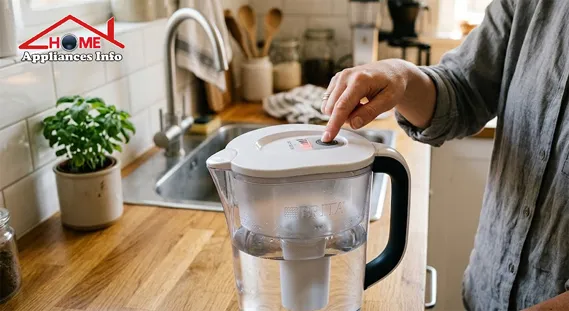
5. Brita SmartLight flashing red: what it usually means
If your brita smartlight flashing red is the issue, the cause is often one of three things:
- The SmartLight was never reset after filter replacement
- The sensor isn’t detecting usage correctly
- The battery or internal electronics are failing
The SmartLight system is designed to estimate filter life based on use. It’s convenient, but it’s still an estimate. In real kitchens, usage patterns vary. A large family can run through filter capacity much faster than a single person.
How I reset a SmartLight pitcher
When testing SmartLight pitchers, I typically do this:
- Fill the pitcher with cold water
- Make sure the filter is seated correctly
- Press and hold the reset button for around 5 seconds
- Wait for a green confirmation flash
- Release the button
If the brita smartlight flashing red problem continues, I check:
- Water level
- Sensor cleanliness
- Filter alignment
- Age of the pitcher
Mineral buildup can affect sensors over time. A gentle wipe with a soft cloth can help. For stubborn residue, I’ve had decent results with a mild vinegar-water cleaning solution on the non-electronic surfaces.
6. Brita status button not working: battery and electronics issues
Sometimes the light won’t reset because the brita status button not working issue is the real problem.
This is especially common in older pitchers. Many Brita indicators use a sealed battery, and once that battery dies, there is usually no practical DIY replacement.
Signs the status button may be failing
- No lights at all
- No response when pressed
- Random flashing
- Red light stuck on even after proper reset
- Indicator works intermittently
Likely causes
1. Dead battery
Most sealed indicator batteries last around 2 to 5 years.
2. Water damage
If moisture seeps into the indicator housing, electronics can short out or become unreliable.
3. Worn internal switch
Repeated pressing over time can make the button less responsive.
If you’ve tried the proper reset and the brita status button not working problem continues, replacement may be the realistic next step.
For official product guidance, I recommend reviewing Brita water filter pitchers and checking the company’s support materials. For filter certification details, NSF International is also useful. Consumer maintenance advice from Consumer Reports can add context on filter lifespan and replacement habits.
7. Standard vs Elite: why the reset process confuses so many people
The brita standard vs elite filter reset issue trips people up because the filters look similar in use, but they’re not identical in lifespan or setup.
Here’s the practical difference:
| Feature | Standard Filter | Elite Filter |
|---|---|---|
| Color | White | Blue |
| Lifespan | 2 months / 40 gallons | 6 months / 120 gallons |
| Reset Hold Time | 2 seconds | 6 seconds |
| Presoak Required | Yes, typically 15–20 min | Usually no |
| Typical Cost | Lower upfront | Higher upfront |
| Filtration Range | Common contaminants | Broader reduction profile |
If you accidentally use the short reset for an Elite filter, the indicator may not register correctly. That’s why any guide on how to reset Brita filter light should always mention filter type first.
In my experience, people also forget that the longer-lasting Elite filter can create a false sense of “set it and forget it.” But even a long-life cartridge still needs proper installation, occasional cleaning around the pitcher, and correct reset timing.
8. Troubleshooting steps I’d try before replacing the pitcher
If you’re still asking, why is my Brita filter blinking red, here’s the exact troubleshooting order I’d use at home:
Step 1: Remove and reinstall the filter
Take it out. Check for packaging. Reseat it firmly.
Step 2: Prepare the filter correctly
If it’s a standard white filter, soak it first. If it’s an elite blue filter, follow its model-specific prep.
Step 3: Clean the pitcher
Wash the reservoir and lid. Wipe around the indicator area carefully. Mineral residue can interfere with operation.
Step 4: Perform the correct reset
Use the proper hold time for your model. This step solves a surprising number of complaints about how to reset Brita filter light problems.
Step 5: Test water flow
Fill the top chamber and watch how it drains. If it barely moves, the issue may be filter blockage or incorrect installation.
Step 6: Check pitcher age
If the pitcher is several years old and the brita status button not working issue is growing worse, the sealed battery may be at end of life.
I’d rather spend five minutes running this checklist than replace a pitcher unnecessarily.
9. What happens if you ignore the blinking red light?
Ignoring it won’t cause instant disaster, but it can lead to bad habits.
Here’s the real risk: you stop trusting the indicator altogether.
Once that happens, it becomes easy to:
- Forget to change replacement filter on time
- Use an overworked cartridge too long
- Misread future alerts
- Miss genuine performance issues like slow flow or stale taste
Most experts agree that pitcher indicators are best treated as reminders, not lab instruments. They help with routine maintenance. They do not replace common sense. If your water tastes odd, smells strange, or filters unusually slowly, check the system even if the light isn’t red.
That same “don’t ignore the symptom” mindset helps with other home issues too, whether it’s How to Clean a Burnt Pizza Pan Without Scrubbing or diagnosing Whirlpool Washer F05 Error Code Troubleshooting before a small problem turns bigger.
FAQs
Why is my Brita filter blinking red even after I changed it?
Usually because the indicator wasn’t reset, or the filter isn’t seated correctly. Start by reinstalling the cartridge and doing the correct reset for your filter type.
How do I reset a Brita standard filter?
Press and hold the STATUS button for about 2 seconds until the green light blinks 3 times.
How do I reset a Brita Elite filter?
Press and hold the STATUS button for about 6 seconds until the green light blinks 3 times. This is the key brita standard vs elite filter reset difference.
What if the Brita status button is not working?
If the brita status button not working problem continues after cleaning and retrying, the sealed battery or internal switch may have failed. Older pitchers often need replacement.
Why is my Brita SmartLight flashing red after reset?
If your brita smartlight flashing red remains active, check filter alignment, water flow, sensor cleanliness, and pitcher age. A failing smartlight indicator battery may also be the cause.
Can I still use the pitcher if the red light is on?
Yes, in many cases you can still use it temporarily. But I would verify the filter age, water taste, and flow rate instead of relying only on the light. If you’re already troubleshooting kitchen maintenance, you might also like Why Does My Air Fryer Smell Like Plastic for another common household concern.
Conclusion
If you’ve been asking, why is my Brita filter blinking red, the answer is usually less alarming than it looks. Most of the time, the issue comes down to one of four things: the filter wasn’t reset, it isn’t installed correctly, water flow is blocked, or the indicator hardware is failing.
I always start with the basics:
- Reseat the filter
- Prepare it correctly
- Clean the pitcher
- Use the right reset timing
That approach solves most cases of brita smartlight flashing red, and it also helps when the brita status button not working issue is only temporary rather than permanent. If you remember just one thing, let it be this: the red light is usually a maintenance reminder, not an emergency alert.
And if the reset still fails after several careful attempts, it may be time to replace the pitcher and move on. That’s frustrating, but it’s better than guessing. Small home systems work best when we trust the signs, verify the basics, and respond early.
If this guide helped, you may also want to bookmark How to Clean a Burnt Pizza Pan Without Scrubbing and Whirlpool Washer F05 Error Code Troubleshooting for similarly practical fixes around the house.
References
- Brita. Brita water filter pitchers
- NSF International. NSF International
- Consumer Reports. Consumer Reports

🌐 FOUNDER & DIGITAL PUBLISHER
Muhammad Ali
Founder | SEO Strategist & E-E-A-T Digital Publishing Specialist

📈 SEO Strategy
🛠️ Appliance Optimization
🛡️ E-E-A-T Standards
Muhammad Ali is a digital publisher, SEO strategist, and founder of Home Appliances Info. He specializes in home appliance optimization, structured schema networks, and advanced E-E-A-T digital publishing standards to ensure accurate, trustworthy content across the platform.